Artificial Intelligence is no longer a concept confined to science fiction or tech labs. It is a living, evolving force embedded in the systems we use every day. From the way businesses operate to how individuals communicate, learn, and make decisions, AI is rapidly becoming the invisible engine driving modern life.
What makes this moment different from previous technological shifts is speed. The pace at which AI is advancing is unprecedented. Entire industries are being reshaped in a matter of years, not decades. Skills are becoming outdated faster than ever, and new opportunities are emerging just as quickly.
The reality is simple: AI is not coming in the future. It is already here, and it is accelerating.
AI Is No Longer a Tool — It’s Becoming the System
In the early days, AI functioned as a support tool. It helped automate repetitive tasks, analyze large datasets, and improve efficiency in specific areas. Businesses adopted it cautiously, using it to enhance existing processes rather than redefine them.
That era is over.
Today, AI is evolving into something much larger. It is no longer just assisting systems; it is becoming the system itself. Modern AI models can write code, generate content, analyze complex data, and even make decisions with minimal human input. These systems are not just reactive—they are proactive.
We are entering the age of autonomous and agent-based AI. These systems can:
Execute multi-step tasks without supervision Learn and adapt in real time Interact with other systems and tools Make decisions based on dynamic inputs
This shift represents a fundamental transformation. Instead of humans directing every action, AI systems are increasingly taking initiative. Businesses are beginning to rely on AI not just for efficiency, but for strategy.
In practical terms, this means:
Customer service is being handled by AI agents Marketing campaigns are being generated and optimized automatically Financial forecasting is being driven by machine learning models Software development is being accelerated through AI-generated code
AI is no longer sitting on the sidelines. It is moving into the center of operations.
The Acceleration Effect: Why AI Is Moving So Fast
One of the most important aspects of AI’s rise is the concept of acceleration. AI improves itself by learning from data, and as more people use AI systems, the amount of data increases exponentially.
This creates a feedback loop:
More users generate more data More data improves AI performance Better performance attracts more users
The result is exponential growth.
Unlike traditional technologies, which often progress in linear steps, AI evolves in leaps. Breakthroughs that once took years are now happening in months. Capabilities that seemed impossible just a short time ago are becoming standard features.
This acceleration is being driven by several key factors:
Advances in computing power The availability of massive datasets Improvements in machine learning algorithms Increased investment from major tech companies
The combination of these factors has created a perfect environment for rapid innovation.
The Double-Edged Sword of AI
While AI offers enormous benefits, it also introduces significant risks. The same capabilities that make AI powerful can also be used in harmful ways.
One of the most pressing concerns is cybersecurity.
AI has transformed how organizations defend against threats. It can detect anomalies, identify vulnerabilities, and respond to attacks faster than any human team. However, attackers are also using AI to enhance their capabilities.
This has led to a new kind of arms race.
AI-powered cyber threats can:
Automatically scan systems for weaknesses Generate highly convincing phishing attacks Adapt to security measures in real time Scale attacks across multiple targets simultaneously
The result is a more complex and dangerous digital landscape.
Beyond cybersecurity, AI also raises concerns about misinformation. AI-generated content can be used to create fake news, deepfakes, and misleading information at scale. As these tools become more sophisticated, it becomes increasingly difficult to distinguish between what is real and what is artificial.
This has serious implications for trust, media, and society as a whole.
The Hidden Cost: Data and Privacy
AI systems rely heavily on data. The more data they have, the better they perform. This creates a tension between innovation and privacy.
Every interaction with AI generates data. This includes:
Search queries Messages and prompts Behavioral patterns Preferences and habits
Over time, this data can be used to build detailed profiles of individuals.
The challenge is that many users are not fully aware of how their data is being collected and used. While regulations are beginning to address these issues, they often struggle to keep pace with technological advancements.
Privacy is becoming one of the defining issues of the AI era.
There are several key concerns:
Lack of transparency in data collection Potential misuse of personal information Data breaches and security risks The ethical implications of surveillance
As AI continues to evolve, the balance between convenience and privacy will become increasingly important.
AI and the Transformation of Work
One of the most visible impacts of AI is its effect on the workforce.
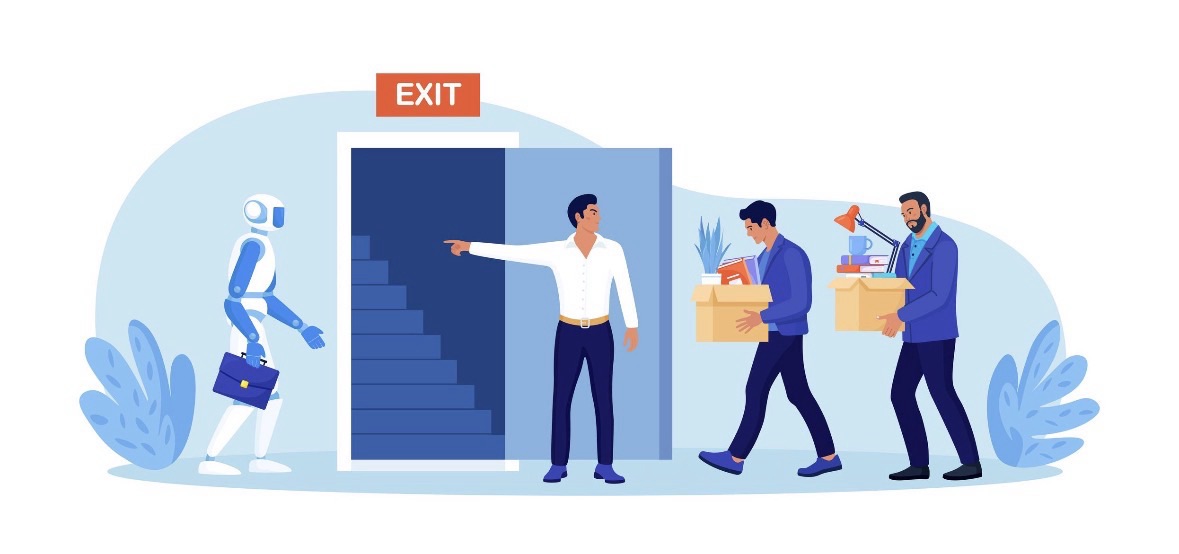
There is a common narrative that AI will eliminate jobs. While there is some truth to this, the reality is more nuanced. AI is not simply removing jobs; it is transforming them.
Many roles that involve repetitive or predictable tasks are being automated. This includes:
Data entry Basic customer support Routine analysis Administrative tasks
At the same time, new roles are being created. These often require a different set of skills, including:
Working alongside AI systems Interpreting AI-generated insights Managing and optimizing AI tools Creative and strategic thinking
The key shift is from execution to oversight.
Workers are increasingly expected to guide, supervise, and collaborate with AI rather than perform tasks manually. This requires adaptability and a willingness to learn new skills.
The concept of “AI literacy” is becoming essential. Understanding how AI works, what it can do, and how to use it effectively will be a critical advantage in the job market.
The Rise of the AI-Augmented Individual
One of the most exciting aspects of AI is its ability to amplify human capabilities.
Individuals can now achieve more than ever before by leveraging AI tools. This includes:
Creating content at scale Building businesses with fewer resources Learning new skills بسرعة Automating personal workflows
A single व्यक्ति can now perform tasks that previously required entire teams.
This has led to the rise of the AI-augmented individual—a person who uses AI to enhance their productivity, creativity, and decision-making.
For example:
A content creator can generate articles, videos, and social media posts with AI assistance An entrepreneur can automate customer interactions and marketing campaigns A developer can write and debug code more efficiently
This shift is lowering barriers to entry across many fields.
However, it also increases competition. As more people gain access to powerful tools, standing out becomes more challenging.
Businesses in the Age of AI
For businesses, AI represents both an opportunity and a necessity.
Organizations that successfully integrate AI can achieve:
Increased efficiency Better decision-making Enhanced customer experiences Reduced operational costs
However, adopting AI is not simply a matter of implementing new technology. It requires a fundamental shift in mindset.
Businesses must rethink how they operate, including:
Redesigning workflows to incorporate AI Training employees to work with AI tools Ensuring ethical and responsible use of AI Managing data effectively
Companies that fail to adapt risk falling behind.
At the same time, there is a growing divide between organizations that leverage AI effectively and those that do not. This gap is likely to widen over time, creating a competitive advantage for early adopters.
Ethical Challenges and Responsibility
As AI becomes more powerful, questions about ethics and responsibility become more important.
Key issues include:
Bias in AI systems Accountability for AI decisions The impact on employment The use of AI in surveillance and control
AI systems are only as good as the data they are trained on. If that data contains biases, the AI can perpetuate or even amplify those biases.
This raises important questions:
Who is responsible when AI makes a mistake? How can we ensure fairness and transparency? What safeguards should be in place?
Addressing these challenges will require collaboration between governments, businesses, and researchers.
The Global AI Race
AI is not just a technological issue; it is also a geopolitical one.
Countries around the world are investing heavily in AI to gain a competitive edge. This includes:
Developing advanced AI technologies Building infrastructure to support AI Training a skilled workforce Establishing regulations and standards
The global race for AI leadership has significant implications for economic power, national security, and international relations.
Nations that lead in AI will have a major advantage in shaping the future.
What Happens Next?
Predicting the future of AI is difficult because of its rapid pace of change. However, several trends are likely to define the next phase:
Increased Autonomy AI systems will become more independent, handling complex tasks with minimal human input. Deeper Integration AI will be embedded in more aspects of daily life, from smart homes to healthcare. Improved Human-AI Collaboration The relationship between humans and AI will become more seamless and intuitive. Stronger Regulation Governments will introduce new rules to address privacy, security, and ethical concerns. Continued Innovation Breakthroughs in AI will continue to push the boundaries of what is possible.
The Bottom Line
Artificial Intelligence is not just another technological trend. It is a transformative force that is reshaping the world at every level.
It is changing how we work, how we communicate, how we make decisions, and how we understand information.
The impact of AI will not be evenly distributed. Some individuals and organizations will benefit greatly, while others may struggle to adapt.
The key to navigating this new landscape is awareness and action.
Learn how AI works Explore how it can be used effectively Stay informed about its risks and implications Adapt to the changing environment
The future will belong to those who understand and embrace AI, not those who ignore it.
SEO Title:
AI in 2026: How Artificial Intelligence Is Transforming Jobs, Security, and the Future
Brief Description:
Artificial Intelligence is evolving at an unprecedented pace, transforming industries, redefining jobs, and raising new challenges in cybersecurity and privacy. This in-depth article explores how AI is reshaping the world in 2026 and what it means for individuals, businesses, and the future.
osion: How Artificial Intelligence Is Rewriting the Future (Faster Than You Think)
Artificial Intelligence is no longer a concept confined to science fiction or tech labs. It is a living, evolving force embedded in the systems we use every day. From the way businesses operate to how individuals communicate, learn, and make decisions, AI is rapidly becoming the invisible engine driving modern life.
What makes this moment different from previous technological shifts is speed. The pace at which AI is advancing is unprecedented. Entire industries are being reshaped in a matter of years, not decades. Skills are becoming outdated faster than ever, and new opportunities are emerging just as quickly.
The reality is simple: AI is not coming in the future. It is already here, and it is accelerating.
AI Is No Longer a Tool — It’s Becoming the System
In the early days, AI functioned as a support tool. It helped automate repetitive tasks, analyze large datasets, and improve efficiency in specific areas. Businesses adopted it cautiously, using it to enhance existing processes rather than redefine them.
That era is over.
Today, AI is evolving into something much larger. It is no longer just assisting systems; it is becoming the system itself. Modern AI models can write code, generate content, analyze complex data, and even make decisions with minimal human input. These systems are not just reactive—they are proactive.
We are entering the age of autonomous and agent-based AI. These systems can:
Execute multi-step tasks without supervision Learn and adapt in real time Interact with other systems and tools Make decisions based on dynamic inputs
This shift represents a fundamental transformation. Instead of humans directing every action, AI systems are increasingly taking initiative. Businesses are beginning to rely on AI not just for efficiency, but for strategy.
In practical terms, this means:
Customer service is being handled by AI agents Marketing campaigns are being generated and optimized automatically Financial forecasting is being driven by machine learning models Software development is being accelerated through AI-generated code
AI is no longer sitting on the sidelines. It is moving into the center of operations.
The Acceleration Effect: Why AI Is Moving So Fast
One of the most important aspects of AI’s rise is the concept of acceleration. AI improves itself by learning from data, and as more people use AI systems, the amount of data increases exponentially.
This creates a feedback loop:
More users generate more data More data improves AI performance Better performance attracts more users
The result is exponential growth.
Unlike traditional technologies, which often progress in linear steps, AI evolves in leaps. Breakthroughs that once took years are now happening in months. Capabilities that seemed impossible just a short time ago are becoming standard features.
This acceleration is being driven by several key factors:
Advances in computing power The availability of massive datasets Improvements in machine learning algorithms Increased investment from major tech companies
The combination of these factors has created a perfect environment for rapid innovation.
The Double-Edged Sword of AI
While AI offers enormous benefits, it also introduces significant risks. The same capabilities that make AI powerful can also be used in harmful ways.
One of the most pressing concerns is cybersecurity.
AI has transformed how organizations defend against threats. It can detect anomalies, identify vulnerabilities, and respond to attacks faster than any human team. However, attackers are also using AI to enhance their capabilities.
This has led to a new kind of arms race.
AI-powered cyber threats can:
Automatically scan systems for weaknesses Generate highly convincing phishing attacks Adapt to security measures in real time Scale attacks across multiple targets simultaneously
The result is a more complex and dangerous digital landscape.
Beyond cybersecurity, AI also raises concerns about misinformation. AI-generated content can be used to create fake news, deepfakes, and misleading information at scale. As these tools become more sophisticated, it becomes increasingly difficult to distinguish between what is real and what is artificial.
This has serious implications for trust, media, and society as a whole.
The Hidden Cost: Data and Privacy
AI systems rely heavily on data. The more data they have, the better they perform. This creates a tension between innovation and privacy.
Every interaction with AI generates data. This includes:
Search queries Messages and prompts Behavioral patterns Preferences and habits
Over time, this data can be used to build detailed profiles of individuals.
The challenge is that many users are not fully aware of how their data is being collected and used. While regulations are beginning to address these issues, they often struggle to keep pace with technological advancements.
Privacy is becoming one of the defining issues of the AI era.
There are several key concerns:
Lack of transparency in data collection Potential misuse of personal information Data breaches and security risks The ethical implications of surveillance
As AI continues to evolve, the balance between convenience and privacy will become increasingly important.
AI and the Transformation of Work
One of the most visible impacts of AI is its effect on the workforce.
There is a common narrative that AI will eliminate jobs. While there is some truth to this, the reality is more nuanced. AI is not simply removing jobs; it is transforming them.
Many roles that involve repetitive or predictable tasks are being automated. This includes:
Data entry Basic customer support Routine analysis Administrative tasks
At the same time, new roles are being created. These often require a different set of skills, including:
Working alongside AI systems Interpreting AI-generated insights Managing and optimizing AI tools Creative and strategic thinking
The key shift is from execution to oversight.
Workers are increasingly expected to guide, supervise, and collaborate with AI rather than perform tasks manually. This requires adaptability and a willingness to learn new skills.
The concept of “AI literacy” is becoming essential. Understanding how AI works, what it can do, and how to use it effectively will be a critical advantage in the job market.
The Rise of the AI-Augmented Individual
One of the most exciting aspects of AI is its ability to amplify human capabilities.
Individuals can now achieve more than ever before by leveraging AI tools. This includes:
Creating content at scale Building businesses with fewer resources Learning new skills بسرعة Automating personal workflows
A single व्यक्ति can now perform tasks that previously required entire teams.
This has led to the rise of the AI-augmented individual—a person who uses AI to enhance their productivity, creativity, and decision-making.
For example:
A content creator can generate articles, videos, and social media posts with AI assistance An entrepreneur can automate customer interactions and marketing campaigns A developer can write and debug code more efficiently
This shift is lowering barriers to entry across many fields.
However, it also increases competition. As more people gain access to powerful tools, standing out becomes more challenging.
Businesses in the Age of AI
For businesses, AI represents both an opportunity and a necessity.
Organizations that successfully integrate AI can achieve:
Increased efficiency Better decision-making Enhanced customer experiences Reduced operational costs
However, adopting AI is not simply a matter of implementing new technology. It requires a fundamental shift in mindset.
Businesses must rethink how they operate, including:
Redesigning workflows to incorporate AI Training employees to work with AI tools Ensuring ethical and responsible use of AI Managing data effectively
Companies that fail to adapt risk falling behind.
At the same time, there is a growing divide between organizations that leverage AI effectively and those that do not. This gap is likely to widen over time, creating a competitive advantage for early adopters.
Ethical Challenges and Responsibility
As AI becomes more powerful, questions about ethics and responsibility become more important.
Key issues include:
Bias in AI systems Accountability for AI decisions The impact on employment The use of AI in surveillance and control
AI systems are only as good as the data they are trained on. If that data contains biases, the AI can perpetuate or even amplify those biases.
This raises important questions:
Who is responsible when AI makes a mistake? How can we ensure fairness and transparency? What safeguards should be in place?
Addressing these challenges will require collaboration between governments, businesses, and researchers.
The Global AI Race
AI is not just a technological issue; it is also a geopolitical one.
Countries around the world are investing heavily in AI to gain a competitive edge. This includes:
Developing advanced AI technologies Building infrastructure to support AI Training a skilled workforce Establishing regulations and standards
The global race for AI leadership has significant implications for economic power, national security, and international relations.
Nations that lead in AI will have a major advantage in shaping the future.
What Happens Next?
Predicting the future of AI is difficult because of its rapid pace of change. However, several trends are likely to define the next phase:
Increased Autonomy AI systems will become more independent, handling complex tasks with minimal human input. Deeper Integration AI will be embedded in more aspects of daily life, from smart homes to healthcare. Improved Human-AI Collaboration The relationship between humans and AI will become more seamless and intuitive. Stronger Regulation Governments will introduce new rules to address privacy, security, and ethical concerns. Continued Innovation Breakthroughs in AI will continue to push the boundaries of what is possible.
The Bottom Line
Artificial Intelligence is not just another technological trend. It is a transformative force that is reshaping the world at every level.
It is changing how we work, how we communicate, how we make decisions, and how we understand information.
The impact of AI will not be evenly distributed. Some individuals and organizations will benefit greatly, while others may struggle to adapt.
The key to navigating this new landscape is awareness and action.
Learn how AI works Explore how it can be used effectively Stay informed about its risks and implications Adapt to the changing environment
The future will belong to those who understand and embrace AI, not those who ignore it.
SEO Title:
AI in 2026: How Artificial Intelligence Is Transforming Jobs, Security, and the Future
Brief Description:
Artificial Intelligence is evolving at an unprecedented pace, transforming industries, redefining jobs, and raising new challenges in cybersecurity and privacy. This in-depth article explores how AI is reshaping the world in 2026 and what it means for individuals, businesses, and the future.





 Tech Nova